Aion 2 DPS meter guide: setup, overlay and fight score
Everything you need to run A2 Pro Meter, the free Aion 2 DPS and healing meter for your second screen: install, the overlay, how to read the numbers and how each fight is scored for DPS, healer and tank.
Download freeJoin the DiscordWhat is A2 Pro Meter?
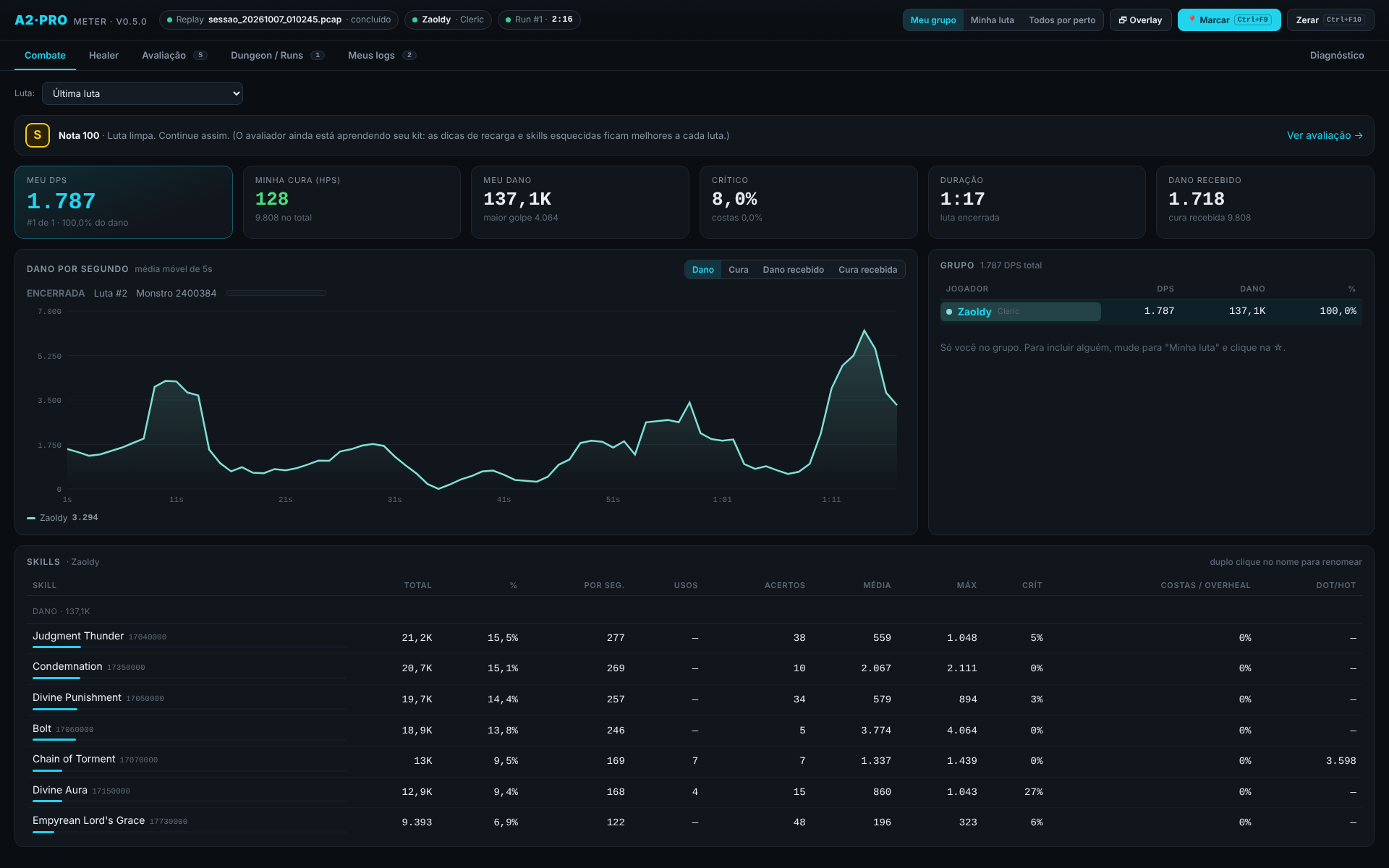
A2 Pro Meter is a Windows combat meter for Aion 2. It shows live DPS, healing (HPS) and damage taken for you and the players around you, with skill names in 9 languages, a per-fight chart, a free overlay that sits on top of the game and a fight score based on your role. It reads the game’s network traffic, so it needs no changes to the game.
Install in 3 steps
- Download the app from the home page and open
A2ProMeter.exe. If Windows SmartScreen warns you, choose “More info → Run anyway” (the app isn’t code-signed yet). - Install Npcap. Npcap is the free packet-capture driver that reads the game traffic. If you don’t have it, the meter shows a button that downloads the official installer from npcap.com; accept the defaults. If you already use another Aion 2 meter, you probably have it.
- Open Aion 2 in windowed or borderless-window mode and fight something. The numbers start appearing on their own, no restart needed.
Requirements: Windows 10 or 11. Mac and Linux are not supported yet.
Is an Aion 2 DPS meter safe? Can I get banned?
NCSoft neither officially allows nor forbids external meters, so the risk is always yours. A2 Pro Meter is passive: it only reads network traffic. It doesn’t inject code into the game, doesn’t read game memory and doesn’t automate any action.
Reading the meter
My fight vs Nearby fights
- My fight shows only you.
- Nearby fights shows every player the game reports around you. In a dungeon that is normally just your party; in the open world it can be anyone close to you.
The four views
| View | What it shows |
|---|---|
| Damage (DPS) | Damage per second per player and each player’s share of the total. |
| Healing (HPS) | Effective healing per second, plus overheal in the healer panel. |
| Damage taken | How much each player took, and from which monster ability. |
| Healing received | Who is being kept alive, and by whom. |
The overlay
The overlay is a small always-on-top window you can drag and resize, with transparency. You can pick Damage, Healing or Damage taken from the panel title, open a second panel and switch between “Fight” and “Nearby”. The overlay is free.
- Run Aion 2 in windowed or borderless-window mode. In exclusive fullscreen no window overlay (from any meter) can draw over the game.
- Ctrl+F8 toggles solid/transparent, Ctrl+F11 unlocks a locked overlay and Ctrl+F10 resets the current fight.
How the fight score works
Instead of only showing numbers, A2 Pro grades every fight from S to D according to your role, and lists what cost you points, worst first. The first fights are provisional while it learns your kit and cooldowns.
| Role | What is measured |
|---|---|
| DPS | Activity (idle time), how well you used skill cooldowns — passive skills are ignored — and avoidable damage taken. |
| Healer | Reaction time to heavy hits, saves on allies below 35% HP and overheal efficiency. |
| Tank | How many of the boss’s heavy hits landed on you (aggro held), plus survival. |
A hit that takes 28% or more of someone’s max HP is treated as a dangerous mechanic. Fight scoring and saved logs are part of the optional Pro plan, which includes a 7-day trial.
Troubleshooting
No numbers appear
Check that Npcap is installed, that Aion 2 is running, and that you fought something after opening the meter. Make sure the view isn’t set to a fight you already closed.
The overlay is black or doesn’t show
Switch the game to windowed or borderless-window mode. If the overlay is black, press Ctrl+F8 to switch between solid and transparent.
Windows shows a warning when opening the app
That is SmartScreen reacting to an app without a paid code-signing certificate. Click “More info → Run anyway”.
Free vs Pro
- Free forever: live DPS and healing, the overlay, skill names, the fight chart and table.
- Pro (R$ 10/month): fight grading with tips, saved signed logs, dungeon runs, the healer panel and community rankings by boss and class. The first time you open the app you get 7 days of Pro.
See the community rankings or read the patch notes. Questions? Join the Discord.